There is a specific kind of spreadsheet work that EPM consultants know all too well.
It is not hard. It is not intellectually stimulating. It does not require deep system knowledge or years of consulting experience. It just requires your full, focused attention for an unreasonably long stretch of time — and the moment you lose focus for even a second, you have introduced an error that will surface three weeks later during UAT, at the worst possible moment.
This is that kind of task.
And after running into it on yet another project, I finally decided to stop accepting it as "just part of the job."
But first — let me tell you exactly why the task exists, because the reason matters.
Start with Oracle EDM
Before we talk about any script, let us talk about Oracle Enterprise Data Management — Oracle EDM — because it is the foundation that makes everything else in this article possible.
Oracle EDM is Oracle's enterprise master data management platform. It is not a tool built exclusively for EPM, or exclusively for ERP. It is a purpose-built MDM platform designed to manage and govern dimension metadata across the full breadth of an organisation's systems — EPM applications like Oracle FCCS, EPBCS, and ARCS; ERP systems like Oracle EBS and Fusion; and non-EPM, non-ERP applications that consume the same metadata. It serves FP&A teams who need clean, governed financial dimensions, and it equally serves operational teams managing metadata like cost centers, projects, or organisational units that flow through HR, procurement, and supply chain systems.
That breadth is what makes Oracle EDM genuinely powerful. It is not a point solution. It is the single source of truth for dimension metadata across the organisation — regardless of which system that metadata eventually lands in.
When Oracle EDM is well implemented, it brings:
- A governed, versioned record of every dimension member across your landscape
- Structured approval workflows for every change — no dimension moves without sign-off
- Every modification logged: who changed what, when, and why
- Consistent, synchronised dimension data pushed to multiple subscriber applications from one authoritative source
- Naming rules and property validations enforced at the point of entry, not discovered at load time
- Full history and the ability to roll back to any prior state
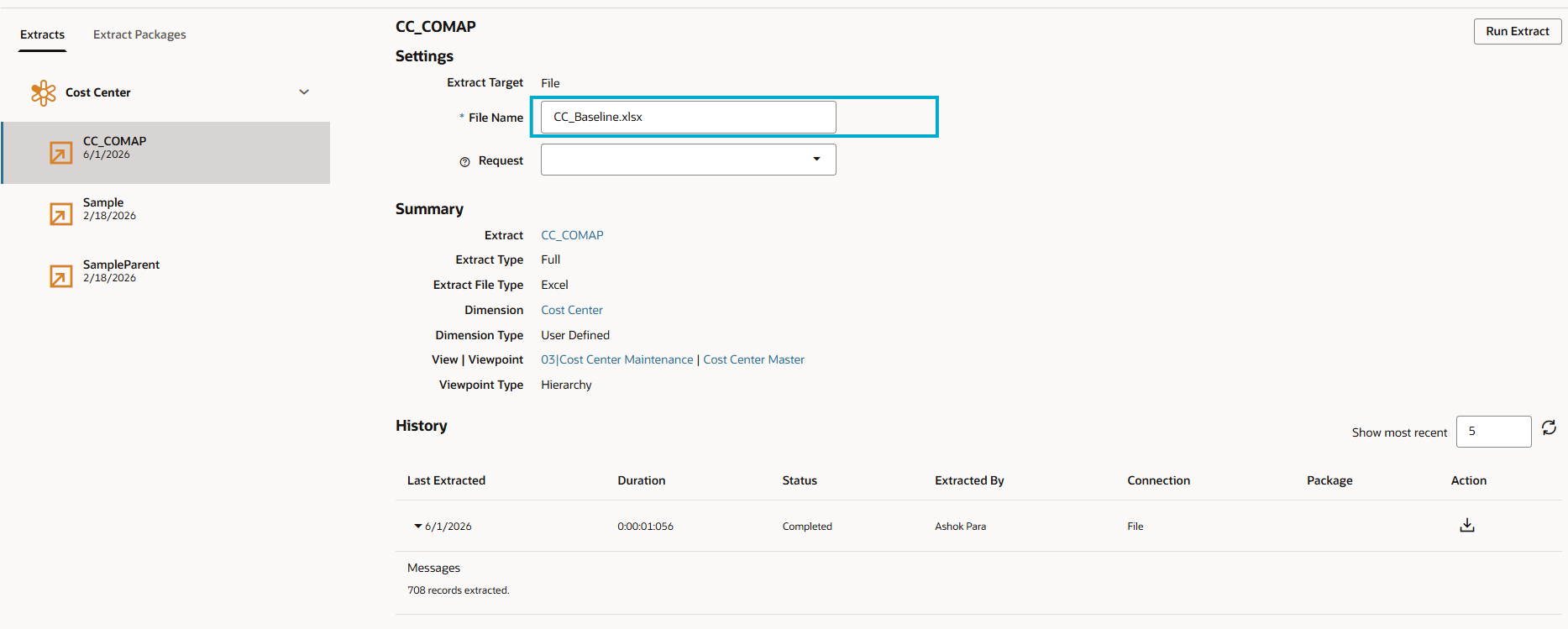
Oracle EDM Cloud — the CC_COMAP extract configured to output CC_Baseline.xlsx from the Cost Center dimension. This is the governed source that feeds everything downstream.
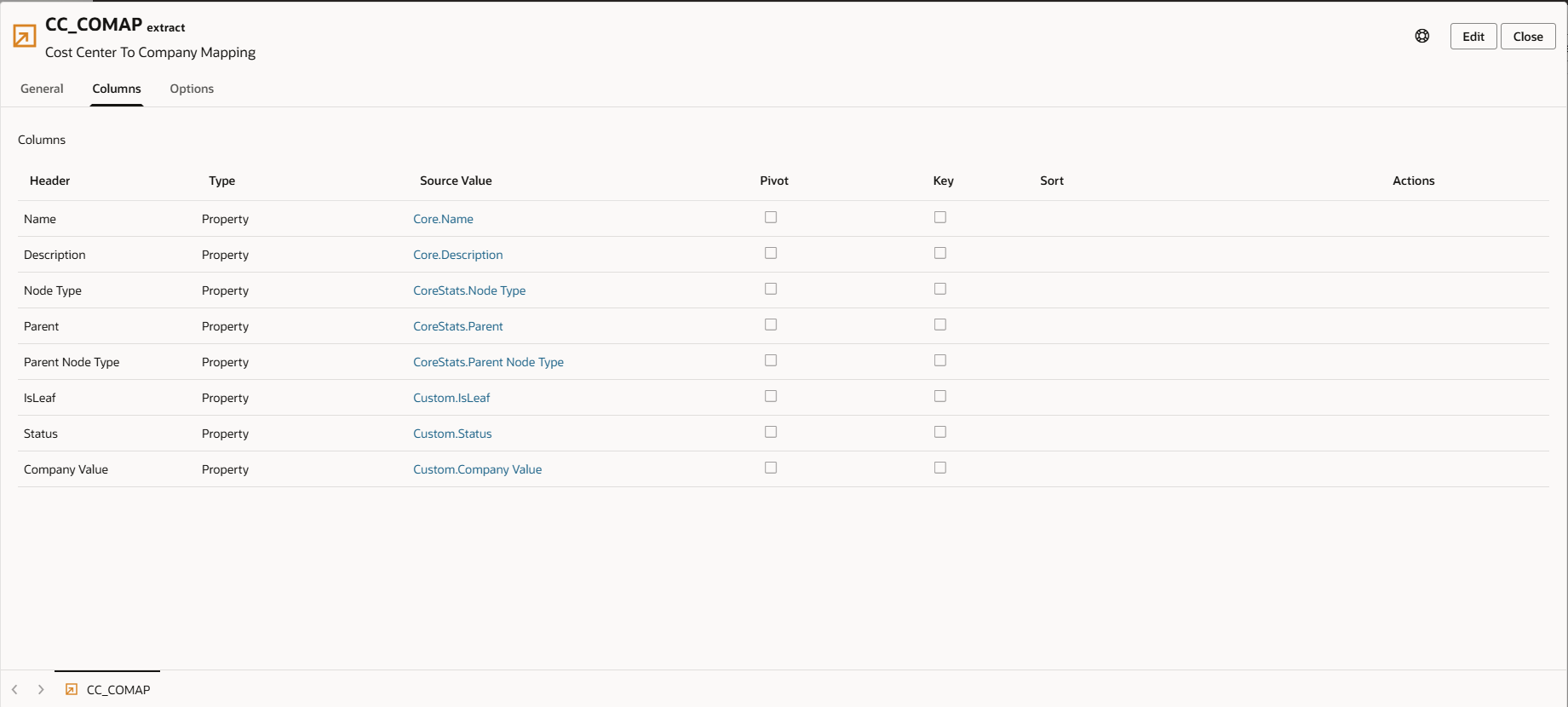
Oracle EDM — CC_COMAP extract Columns tab, showing how dimension properties (Name, Description, Node Type, Parent, Parent Node Type, Company Value) are mapped for the extract.
Oracle EDM manages cost center dimensions. It manages company and legal entity dimensions. It governs them, versions them, routes changes through approvals, and synchronises them to downstream applications — across EPM, ERP, and beyond.
What it does not handle natively — through its subscription and output framework — is generating a concatenated value from two separate dimension segments and pushing that combined member to a downstream app viewpoint.
That is the specific gap. And that is exactly what this script was built to fill.
The Use Case: Concatenated Dimensions for Legal Entity Reporting
In a multi-company implementation, you typically manage two dimension segments independently in Oracle EDM:
- COMPANY / LEGAL ENTITY: 100, 200, 300, 400 …
- COST CENTER: 12345, 54321, 67890 …
These exist as separate dimensions in Oracle EDM. They are governed separately, maintained separately, and pushed to downstream applications separately. That is correct and appropriate.
But the downstream app viewpoints — the application-specific viewpoints in Oracle EDM that feed EPM and other subscriber applications — often require a combined member for divisional reporting or legal entity cost analysis. They need to see values like 100-12345, 200-54321, and so on. This concatenated value is what allows financial analysts to slice across companies and cost centers simultaneously in their legal entity or divisional reports.
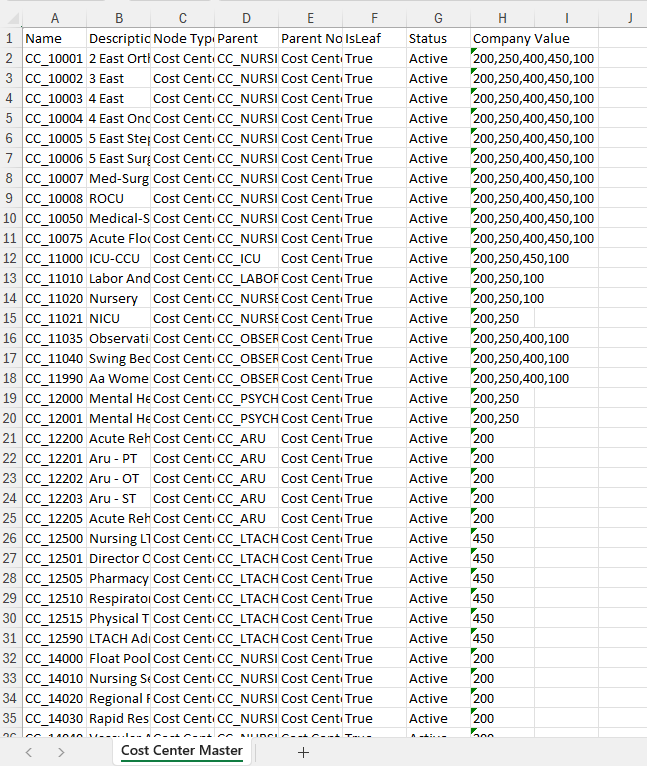
CC_Baseline.xlsx — the raw Cost Center Master sheet produced from the Oracle EDM extract. Note the Company Value column with comma-separated company assignments like "200,250,400,450,100" — each of these becomes a separate concatenated output row.
Oracle EDM's subscription framework is excellent at pushing governed dimension members to downstream applications. What it does not do natively is generate a cross-dimension concatenated member — a new object formed by combining two separate dimension segments — at the point of output to a viewpoint.
This is not a criticism of Oracle EDM. It is a description of a specific output requirement that belongs downstream of what EDM was built to do.
What "Doing It in Excel" Actually Costs You
The transformation logic sounds simple until you write it out:
- Strip the
CC_prefix off the Name column - Strip the
CC_prefix off the Parent column - Strip the
CO_prefix off each company code - Concatenate:
{company number}-{stripped cost center name} - Produce a separate row for every company in that comma-separated list
- Skip any row that has no company assignment (hierarchy-only nodes)
Now multiply that across 300+ cost centers, some assigned to four or five companies. You could easily be generating over a thousand output rows from a source file that looks deceptively manageable.
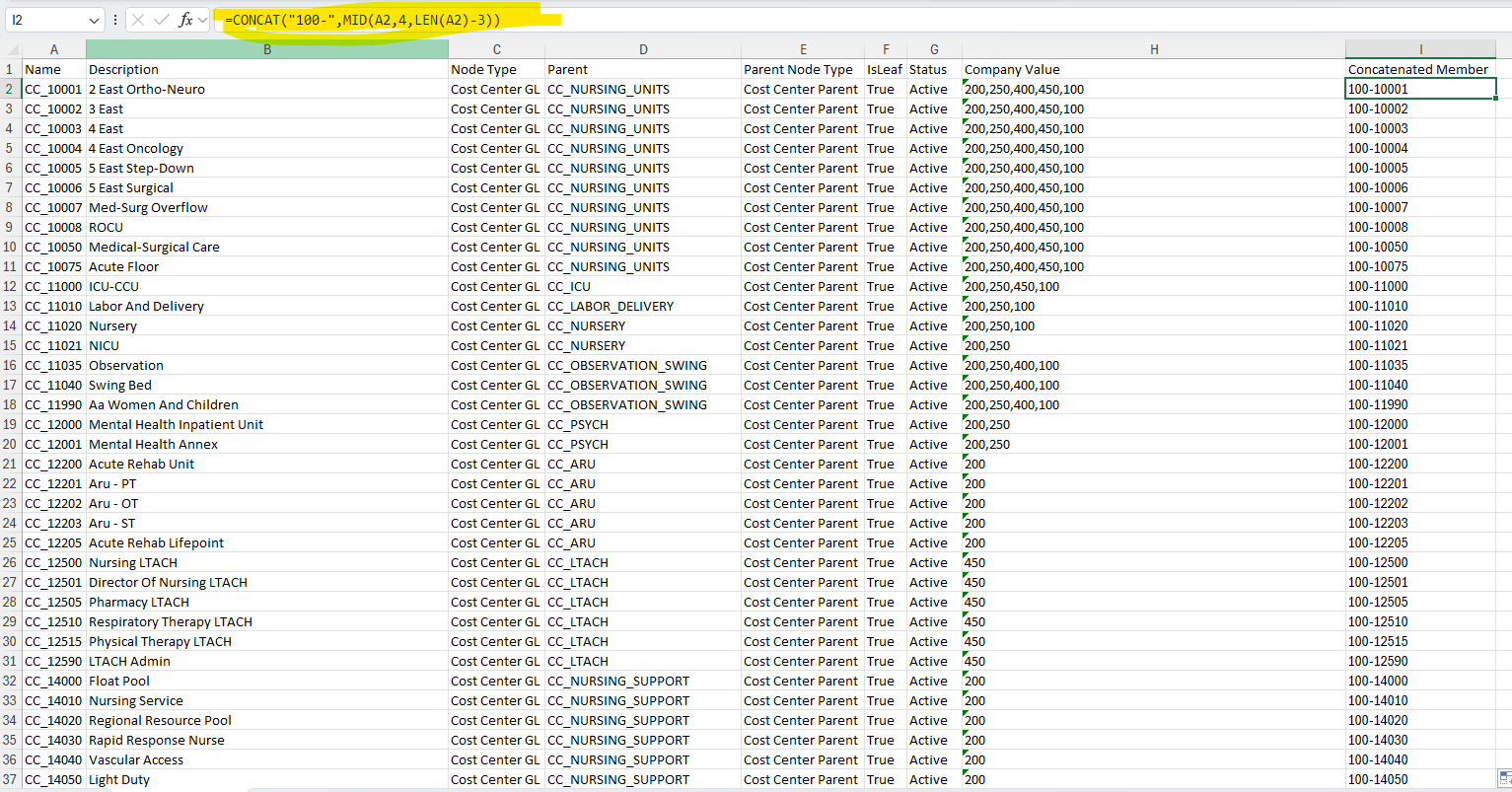
The manual Excel approach — a CONCAT formula in a helper column to build the concatenated member. This only handles one company; the multi-company expansion still requires manual row duplication.
The multi-value company column is the real problem. Excel has no elegant native way to explode a comma-separated cell into multiple rows. And every time Oracle EDM produces an updated baseline — which it will, multiple times during the project — you run the manual process again.
How the Script Complements Oracle EDM
It is worth being precise about where Oracle EDM's work ends and where this script picks up, because the two sit in sequence — not in competition.
Oracle EDM handles: governing the Cost Center dimension, managing the Company / Legal Entity dimension, running approval workflows, versioning every change with a full audit trail, synchronising validated dimension data to subscriber applications.
This script handles: reading the EDM-produced baseline output, generating the concatenated Company-CostCenter members, expanding multi-company cost centers into one row per company, stripping system prefixes, producing a formatted load-ready Excel file, and archiving the baseline with a timestamp.
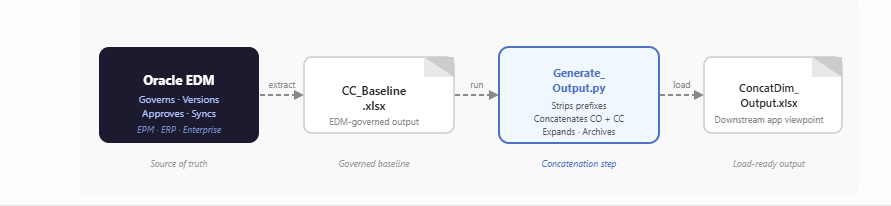
Flow diagram: Oracle EDM (governs, versions, approves) → CC_Baseline.xlsx (EDM extract) → Generate_Output.py (concatenation script) → ConcatDim_Output.xlsx (downstream app viewpoint load). The script sits downstream of EDM, complementing it — not replacing it.
What the Script Does — In Plain English
Step 1: Read the Source File
The script opens the CC_Baseline.xlsx that comes out of the Oracle EDM extract and reads the Cost Center Master sheet into memory — all rows, all columns, ready to be worked with.
Step 2: Find the Company Column
The script checks for both "Company Value" and "Company" column names and uses whichever one has data. Resilient to minor formatting variation in the EDM extract.
Step 3: Expand Each Row by Company
For every cost center row, it reads the company column, splits on commas, and loops through each company. For each one it strips the CO_ prefix off the company code, strips the CC_ prefix off the Name and Parent, builds the concatenated Name (e.g. 100-12345) and Parent, and writes a new output row. One cost center assigned to five companies becomes five output rows.
Step 4: Skip Hierarchy Nodes
Structural nodes with no company assignment come through EDM as hierarchy placeholders. The script skips them automatically — they do not appear in the output.
Step 5: Write a Formatted Output File
The output Excel file includes blue bold headers, alternating row shading, auto-fitted column widths, frozen top row, and light grid borders. It looks like something a human spent time formatting.
Step 6: Archive the Source File
The original EDM baseline is moved to an "Archive Source" folder and renamed with a timestamp — giving you full traceability: EDM version → baseline extract → concatenated output → downstream app viewpoint load.
The Code
Here is the full script open in VS Code. Under 110 lines. Readable, focused, single-purpose — nothing here requires you to be a developer to follow the logic.
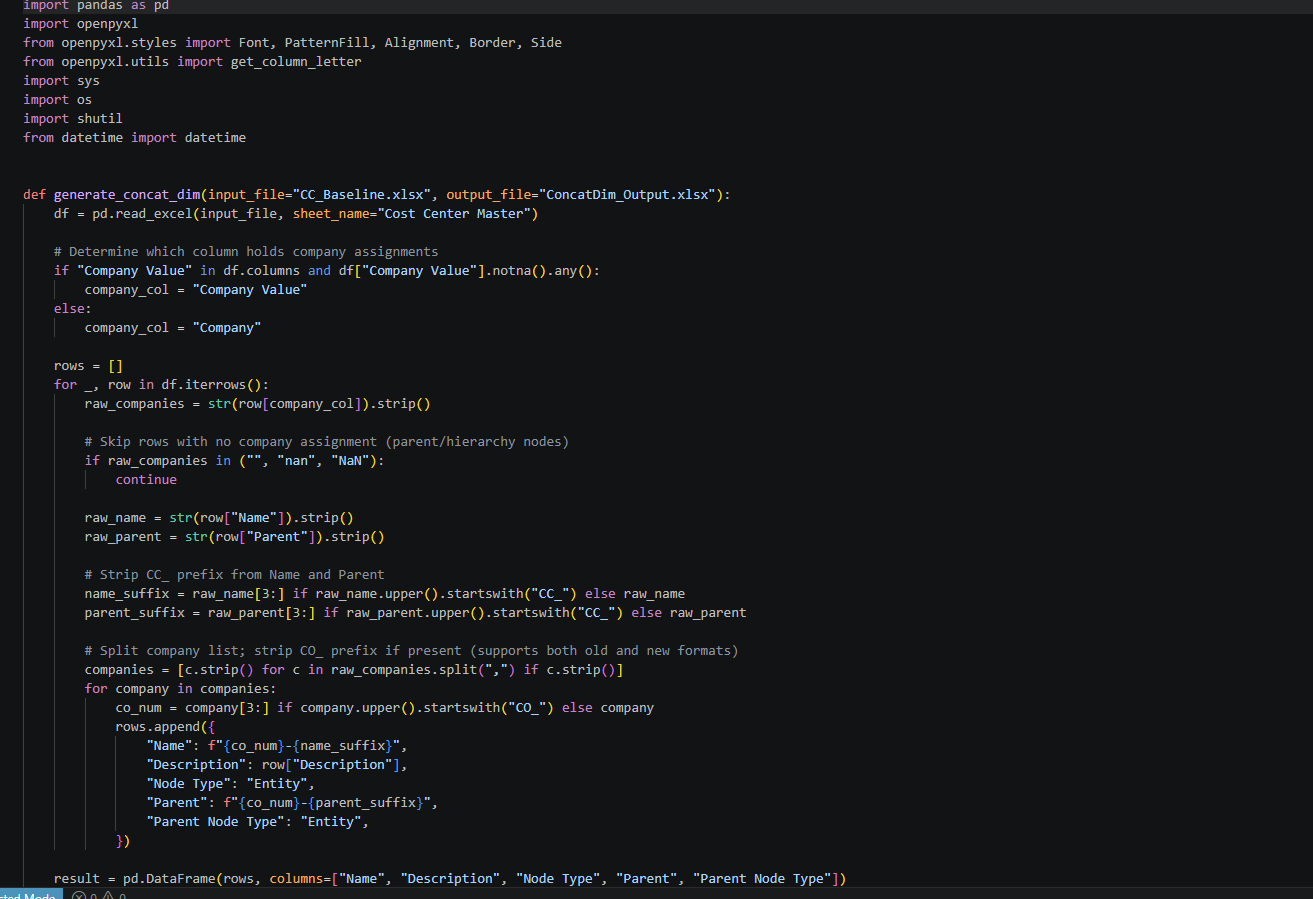
Generate_Output.py open in VS Code — the complete script. Under 110 lines including all formatting logic.
To run it, install Python and two libraries:
pip install pandas openpyxl
Drop CC_Baseline.xlsx in the same folder and run:
python Generate_Output.py
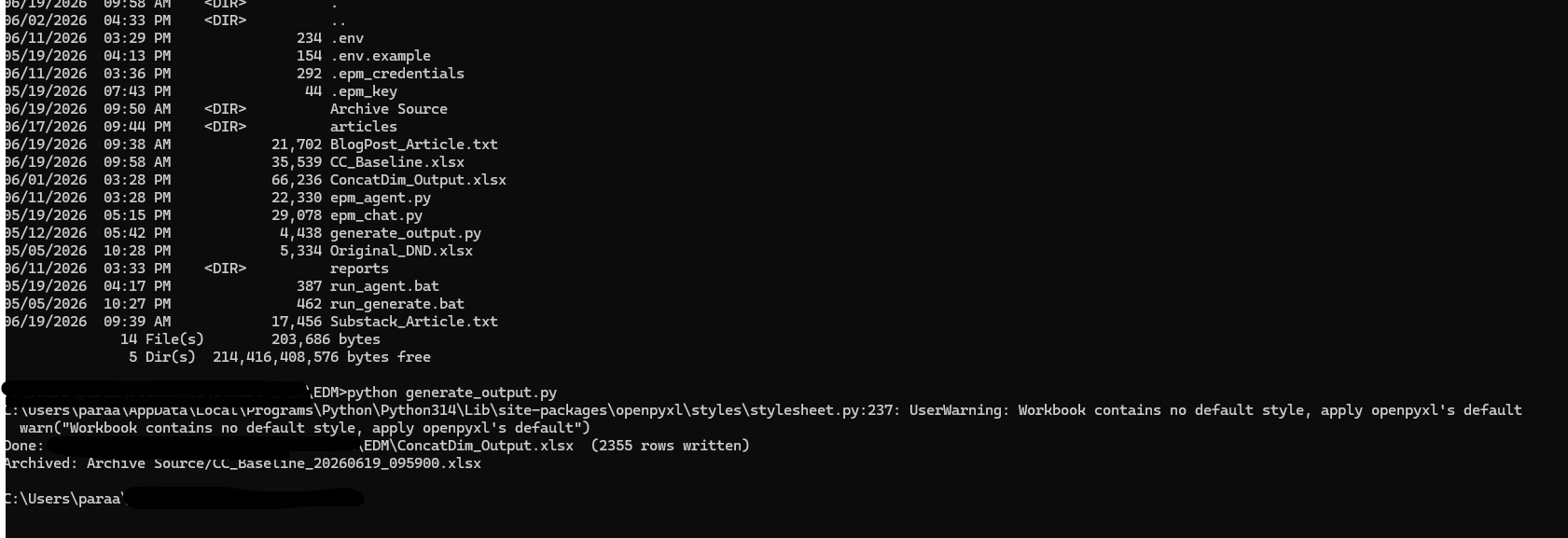
Terminal output after running the script — 2,355 rows written to ConcatDim_Output.xlsx, and the source file archived with a timestamp. The full EDM-to-output chain is complete in seconds.
The Output
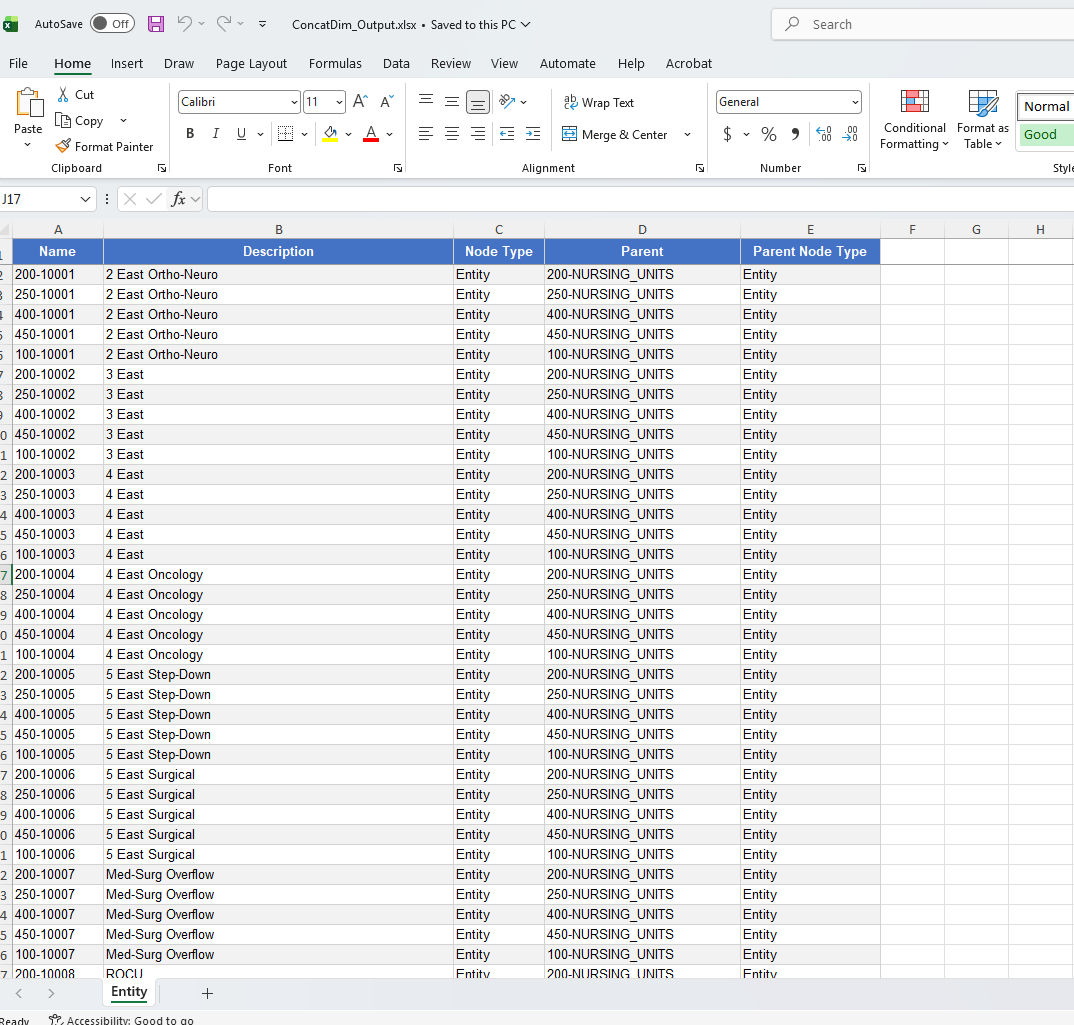
ConcatDim_Output.xlsx — the formatted output ready for loading into the downstream app viewpoint. Blue headers, zebra-striped rows, concatenated Name values like 200-10001, 250-10001, 400-10001 — one row per legal entity per cost center.
Loading into the Downstream App Viewpoint
Once generated, the output file is loaded directly into Oracle EDM's downstream app viewpoint — the Entity viewpoint — via the Load From File function. The file name, sheet name ("Entity"), and column mapping are all pre-configured to match what EDM expects.
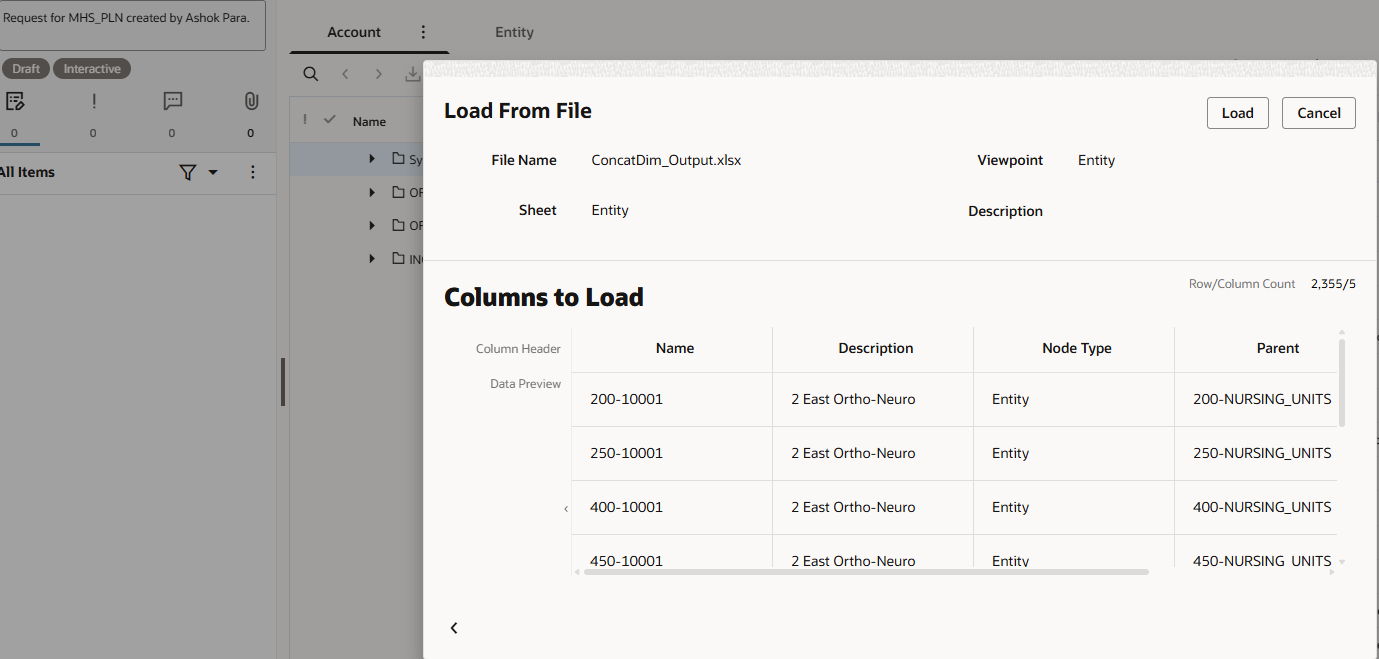
Oracle EDM — Load From File dialog showing ConcatDim_Output.xlsx being loaded into the Entity viewpoint. File Name: ConcatDim_Output.xlsx, Sheet: Entity, Row/Column Count: 2,355/5. The script's output maps directly to what EDM expects.
The result: 2,355 concatenated dimension members — one per legal entity per cost center combination — loaded into the Entity viewpoint of Oracle EDM, ready for downstream application synchronisation.
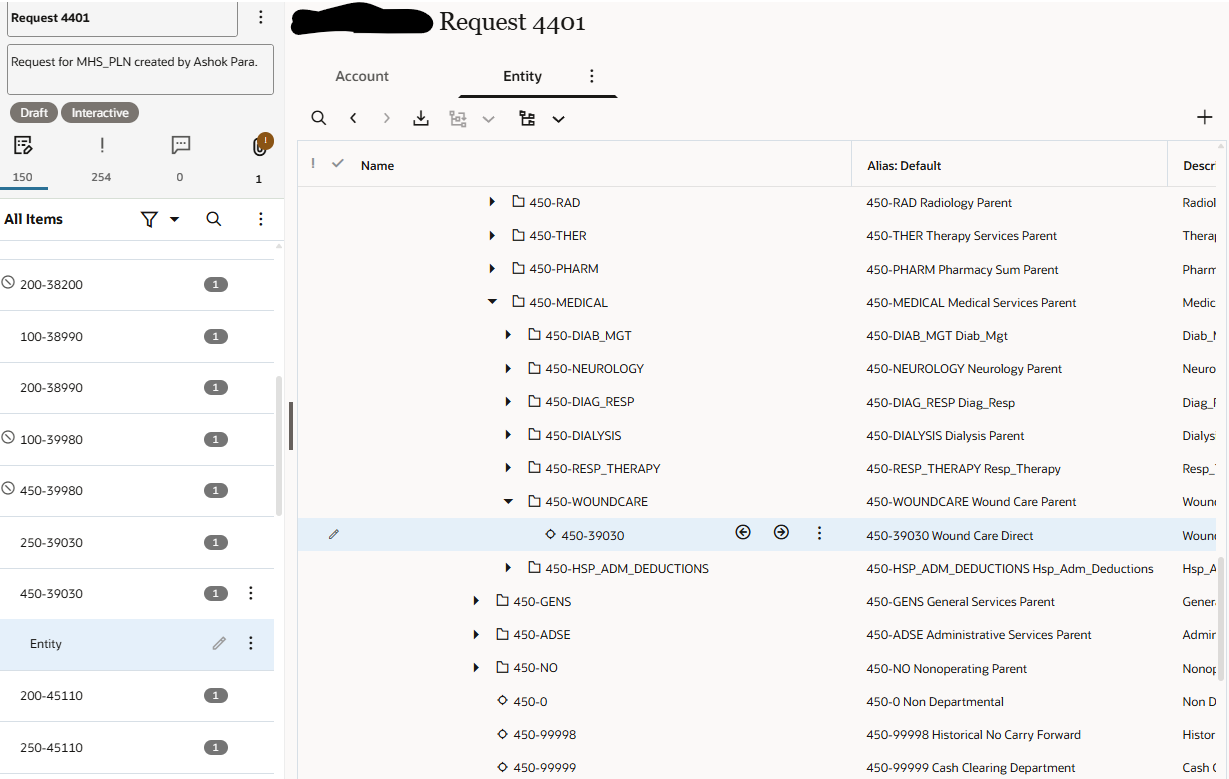
Oracle EDM Request 4401 — the Entity viewpoint after loading, showing concatenated members like 450-WOUNDCARE, 450-39030, 450-GENS across legal entities. The hierarchy is intact. The data is governed. The load is complete.
What I Took Away From Building This
Know Exactly What Your Tool Was Built To Do
Oracle EDM was built to govern, version, and synchronise dimension data across enterprise subscriber applications. It does that exceptionally well. The concatenated cross-dimension member requirement is a downstream formatting concern that sits outside that scope. Knowing precisely where one tool's job ends and another begins is what lets you design the right solution for each part.
Complementary Tools Amplify Each Other
EDM produces clean, validated, governed data. The script takes that clean data and applies a deterministic transformation to produce a specific output format. The quality of the script's output depends entirely on the quality of what EDM produces upstream. That dependency is not a weakness — it is the point.
Traceability Should Run the Full Length of the Chain
EDM versions dimension data. The script timestamps and archives the baseline it ran against. Together: EDM version → baseline extract → concatenated output → downstream app viewpoint load. If anything goes wrong at any point, you can reconstruct exactly what happened and when.
The Bottom Line
Oracle EDM is the right foundation for dimension management — whether you are an FP&A team governing financial dimensions, or an operations team managing the metadata that flows through your ERP and broader enterprise systems. It brings governance, workflow, versioning, and multi-application synchronisation that no spreadsheet process can replicate.
But even with EDM in place, there are specific output requirements — like cross-dimension concatenated members for legal entity and divisional reporting — that fall outside what its subscription framework produces natively. This script fills that specific gap.
The two work together: Oracle EDM governs the data. The script prepares it for a specific downstream format. And the downstream app viewpoint receives exactly what it needs.
Working on an Oracle EDM implementation — whether for EPM, ERP, or operational metadata — and running into dimension prep challenges? I would enjoy that conversation. Drop a comment below or reach out directly.