Every master data program eventually collides with the same uncomfortable truth: the same real-world thing shows up in your systems under different names, different spellings, and a typo nobody caught. Consider three household names, each a different flavor of the same problem:
- JPMorgan Chase arrives as "JPMorgan Chase & Co.," "JP Morgan Chase," and "JPMorgan Chsae" — the same counterparty, undone by spacing, punctuation, and a transposed typo.
- 3M hides behind its legal name, "Minnesota Mining and Manufacturing Company," which shares almost no characters with "3M Company" — no amount of string similarity connects them; only a shared property (a tax ID, a ticker) will.
- Meta used to be "Facebook, Inc." and is now "Meta Platforms, Inc." — the same entity across a corporate rename, where records created years apart legitimately disagree on the name.
To a database, each of these is several distinct records — several distinct rows in a reconciliation, several distinct sources of downstream error.
Oracle Enterprise Data Management Cloud (Oracle EDM Cloud, formerly EDMCS) addresses this class of problem with a dedicated matching capability that spans three related operations: matching and merging new nodes as they arrive, matching and mapping nodes across hierarchies, and deduplicating nodes that already coexist in a viewpoint. This post is a deep dive into how that machinery actually works — the match types, the scoring, the thresholds, the survivorship logic, and the human-in-the-loop workbench that ties it together.
If you govern a chart of accounts, a customer master, a product hierarchy, or any other reference data domain in Oracle EDM, this is the feature that keeps your single source of truth from quietly forking into three.
Those three examples aren't just illustrations — they map cleanly onto the three mechanics this post unpacks. Keep this table in mind as a reader's map:
| The problem | Real-world example | The mechanic that solves it |
|---|---|---|
| Names differ by spelling, spacing, or typos | JPMorgan Chase → "JP Morgan Chase," "JPMorgan Chsae" | Fuzzy matching (Similar To) with a confidence score |
| Names share nothing in common | 3M → "Minnesota Mining and Manufacturing Company" | Property matching (Equals on a shared identifier) |
| Same entity, records disagree on the value | Meta → "Facebook, Inc." vs. "Meta Platforms, Inc." | Survivorship rules decide which value wins |
Why Matching Matters: The Business Case
Before the mechanics, it's worth being clear about what matching buys you.
Duplicate and inconsistent master data is not a cosmetic problem. It inflates counterparty exposure calculations, breaks intercompany eliminations, corrupts spend analytics, undermines regulatory reporting, and forces analysts to spend their days reconciling records that should never have diverged. The cost is rarely visible on a single invoice — it's the slow tax of every report that has to be footnoted, every close that runs long, and every "why don't these two numbers agree" meeting.
Oracle EDM's matching capability attacks the problem at three distinct moments in the data lifecycle:
- At the door (Merging) — Catch a duplicate before it enters the viewpoint, when a new node is being added.
- Across hierarchies (Mapping) — Connect an incoming node to the right parent in a different node type, establishing relationships instead of orphans.
- After the fact (Deduplication) — Find and collapse duplicates that already live side-by-side in a viewpoint.
The unifying idea is fuzzy identity: the recognition that two nodes with different names may nonetheless be the same thing, and that a governed platform should be able to detect that, score its confidence, and route the decision to a human when confidence is imperfect.
The Three Operations at a Glance
| Operation | What It Compares | What Happens on Accept | Primary Use Case |
|---|---|---|---|
| Match & Merge | Incoming request items vs. existing nodes in a node type | Changes from the incoming item are merged into the existing node | Prevent duplicates when adding new nodes |
| Match & Map | Incoming request items vs. existing nodes of a different node type | Incoming node is inserted under the accepted candidate, changing the parent hierarchy | Map nodes into a mapping hierarchy |
| Deduplication | Similar nodes already within a viewpoint | The matched (source) node is deleted; its properties merge into the surviving candidate | Consolidate existing duplicates |
All three share the same underlying engine — matching rules, match scoring, thresholds, a review workbench, and survivorship rules. What differs is the source and target of the comparison, and what the "accept" action ultimately does to the graph.
Anatomy of a Match: The Core Building Blocks
Four configuration objects do the heavy lifting. Understanding them individually is the key to reasoning about the whole system.
1. Matching Rules — How Nodes Are Compared
Matching rules are the brains of the operation. They are created at the Node Type level — you inspect the target node type, then go to Node Type → Rules → Matching → Create to define a rule. (For a mapping rule, you inspect the node type used by the existing nodes in the mapping viewpoint.) They liberate you from the tyranny of exact-name matching: a rule can declare that two nodes match based on properties and match types, not just an identical Name.
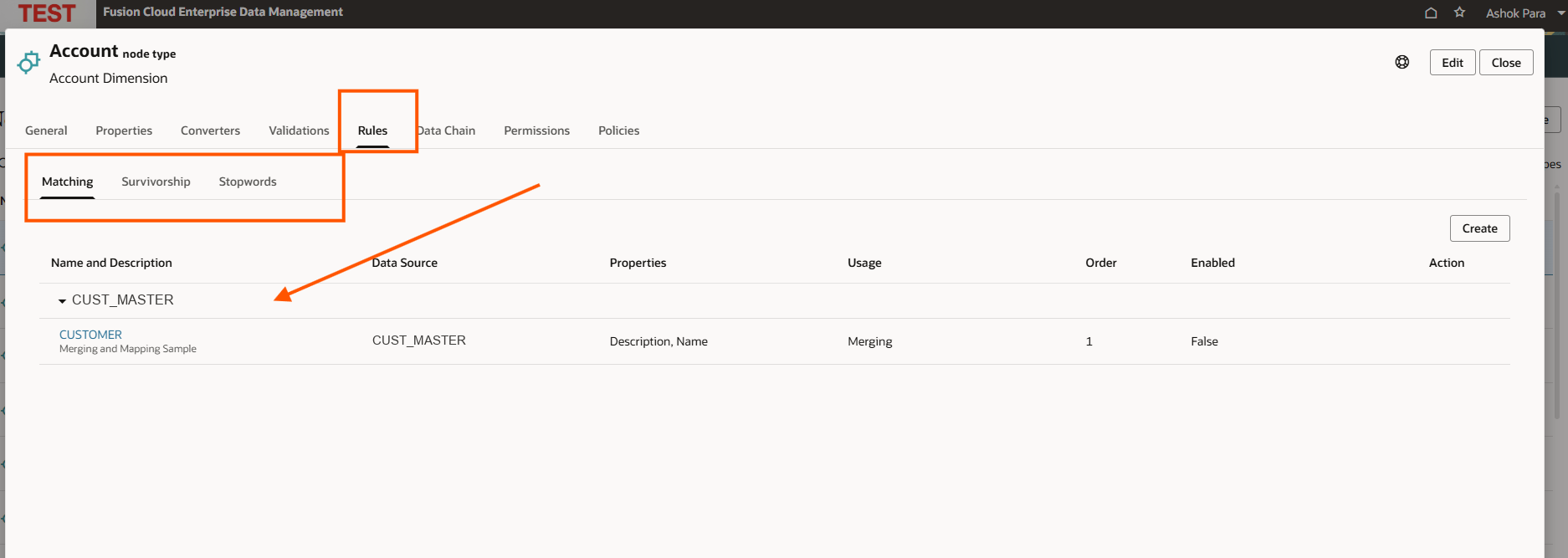
A few structural facts worth internalizing:
- Rules are evaluated in order. You assign each rule an integer order value (adjustable with up/down controls). A practical tip: leave gaps between order values (10, 20, 30…) so you can insert future rules without renumbering everything.
- Multiple rules combine with OR logic. A node is a match candidate if it satisfies any enabled rule.
- Multiple criteria within a single rule combine with AND logic. Every criterion in that rule must be true for it to fire.
- Rules have a usage type: Merging, Mapping, or Deduplication. A rule built for one purpose isn't automatically available to the others.
- A rule is bound to a data source at creation, and that binding is immutable. You can rename, reorder, enable, disable, and re-tune a rule — but you cannot change its data source afterward.
Oracle's own guidance is to keep the rule set lean: enable only the minimum rules you need, and no more than three at once. Every enabled rule adds processing overhead, and an over-eager rule set produces a flood of low-value candidates that bury the good matches.
2. Match Types — The Comparison Operators
The available operators depend on the data type of the property you're matching on. This is where the fuzzy-matching sophistication lives:
| Property Data Type | Available Operators |
|---|---|
| String / Memo / Numeric String / Sequence | Equals, Contains, Similar To (fuzzy) |
| Integer / Float | Equals, Between, Between %, Greater Than, Less Than |
| Date / Timestamp | Equals, Between, Before, After |
| Node | Equals |
| Boolean | Equals |
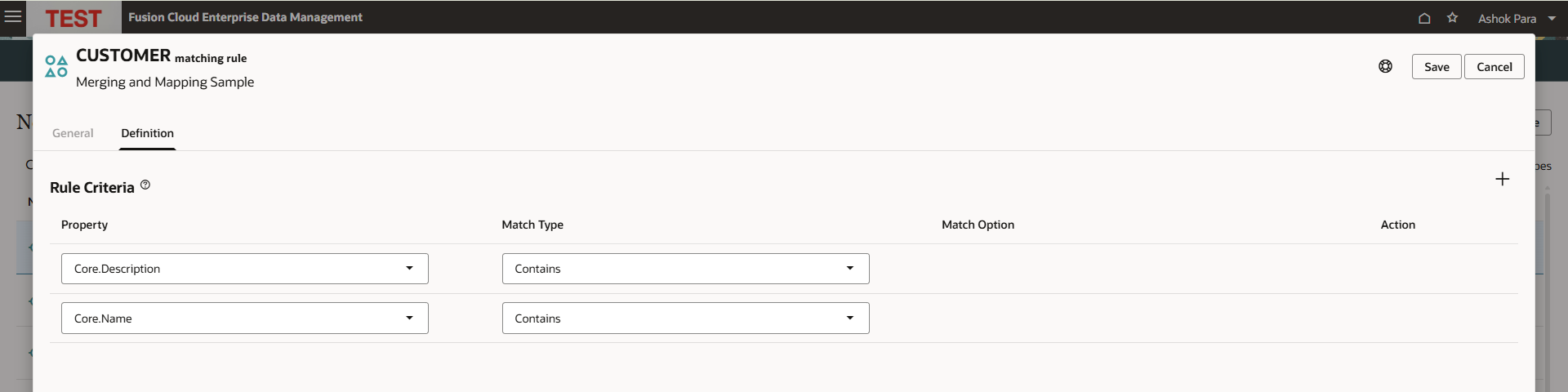
Each row in that grid is one criterion — a Property, a Match Type, and (where relevant) a Match Option such as a Prefix Length or an offset. A closer look at the operators that do the interesting work:
Similar To (fuzzy search) is the star of the show. Applied to string properties, it performs a fuzzy comparison that tolerates typos, transpositions, and spelling variants — this is what lets "JPMorgan Chase & Co." match "JPMorgan Chsae." It accepts an optional Prefix Length, which forces an exact match on the first N characters before fuzzy logic kicks in. Prefix Length is both a precision lever (fewer false positives) and a performance lever (a smaller candidate set to score). But note its limit: fuzzy name matching will never connect "Minnesota Mining and Manufacturing Company" to "3M Company" — they share almost no characters. That case needs an Equals criterion on a shared property (a tax ID, DUNS, or ticker), which is precisely why rules combine criteria with AND and node types combine rules with OR.
Equals does the unglamorous but essential work of exact matching on a discriminating property. For entities whose names diverge completely — legal name vs. brand name, like 3M — an
Equalson a stable identifier is the only thing that will link them. Pair it inside a rule with a looser name check to raise confidence.Between (numeric) uses an absolute offset: an offset of 5 against a value of 10 matches anything from 5 to 15.
Between % (numeric) uses a percentage offset: a 15% offset against 5000 matches the range 4250–5750. Ideal for matching amounts or quantities that should be "roughly equal."
Date Between uses a day offset: a 3-day offset around March 10 matches March 7 through March 13 — useful for reconciling records that represent the same event captured on slightly different dates.
Boolean Equals is flagged as dangerous when used alone: a boolean has only two values, so matching on it in isolation matches roughly half your data. Oracle recommends always pairing a boolean criterion with another property type.
3. Match Scores and Thresholds — Quantifying Confidence
Every candidate a rule surfaces gets a match score from 0 to 100, rendered in the workbench as a colored confidence meter:
- 100 = a complete match against all of the rule's criteria.
- Lower scores = partial matches, e.g. a fuzzy name comparison that shares fewer characters.
A candidate can appear under multiple rules with different scores. Oracle's documentation gives a clean example: a candidate might score 100 on an "Industry Only" rule (industry matches exactly) but only 85 on a "Name and Industry" rule (industry matches, but the fuzzy name comparison is imperfect). Seeing both scores side by side is exactly the context a data steward needs.
Two thresholds govern how scores translate into automation:
Auto Accept Threshold — Candidates meeting or exceeding this score are automatically presented as Accepted in the workbench, ready for the steward to confirm. If several rules clear the threshold, the highest score wins; on a tie, the lowest rule order (highest priority) wins. Available for Merging and Mapping rules only.
Auto Exclude Threshold — Candidates scoring at or below this value are never displayed at all. This is your noise filter, keeping the workbench free of implausible matches. Available for all rule types, including Deduplication.
The gap between these two thresholds defines the human review zone — the band of "maybe" matches where the machine defers to a person. Tuning that band is the central act of operating a matching program: too wide and stewards drown in reviews; too narrow and duplicates slip through automatically or get silently excluded.
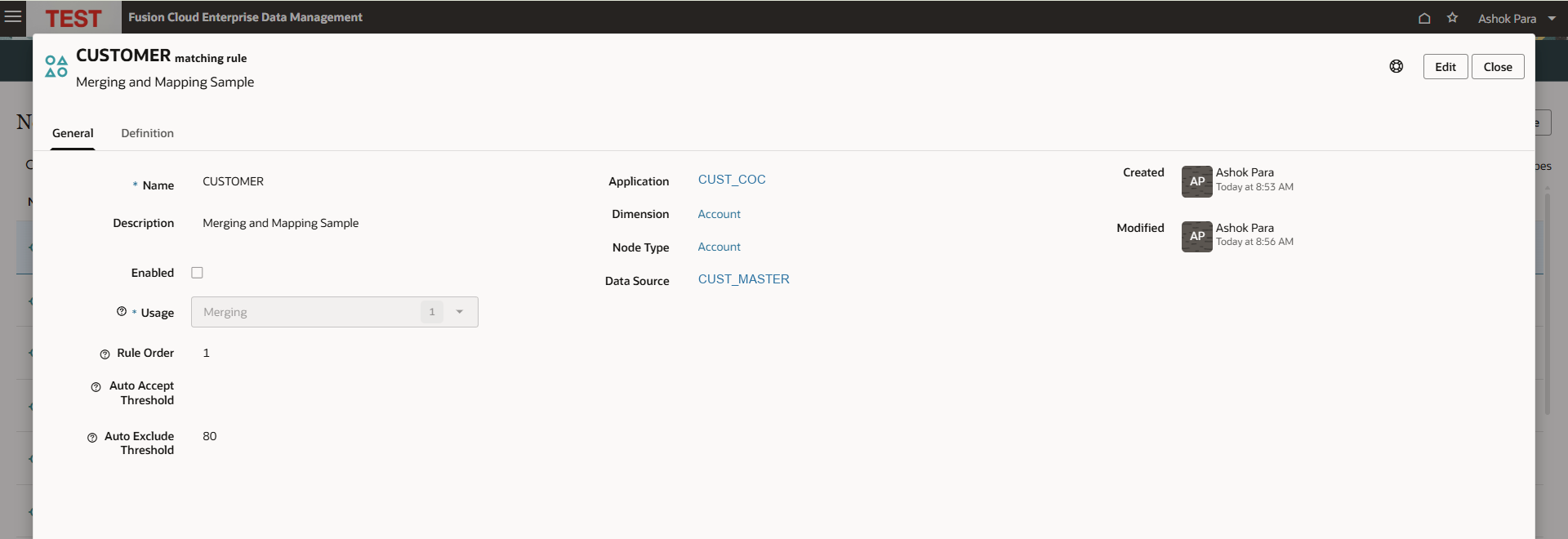
Note on Deduplication: Auto Accept thresholds are not available for deduplication rules — only Auto Exclude. Deduplication is treated as an inherently review-driven operation, because collapsing two nodes that already exist (and deleting one of them) is a higher-stakes action than merging an inbound record that hasn't landed yet.
4. Cluster Keys — Scoping the Search
For deduplication, comparing every node against every other node is combinatorially expensive and rarely necessary. A cluster key narrows the field: you deduplicate within a slice of the data defined by a property value (or by node creation date).
The subtlety worth remembering: the cluster key is applied to the matched (source) nodes only — not to the candidates they're compared against. Oracle's example makes this concrete: deduplicate customers with a cluster key of State = Texas, and only Texas customers are evaluated as source nodes — but they can still match candidates in any state. On merge, the Texas node is deleted and its information flows into the surviving candidate.
Because result sets are scoped per cluster-key value, you run a separate match for each value (each state, in the example). This is deliberate: it keeps each review session focused and each result set independently reviewable.
5. Survivorship Rules — Who Wins the Merge
Matching decides whether two nodes are the same. Survivorship decides which data survives when they're combined. This is the second half of every merge, and getting it wrong quietly corrupts the record you just "cleaned."
Survivorship rules are defined per node type and bound to a data source (immutably, like matching rules). Only one survivorship rule per data source can be enabled for a given node type, and the data source must already have at least one enabled matching rule.
For each property, you choose one of three strategies:
- None (default) — The source value is ignored; the target keeps its existing value.
- Copy — The source value is copied directly onto the target. (A relationship property is copied only if its parent is also copied from the source.)
- Transform — The source value is run through a custom expression before being written to the target. This unlocks null-replacement, lookup-set translation, and populating derived properties. Transform is supported for unregistered data sources only; registered sources should use node type converters instead.
The source/target roles flip depending on the operation:
- Match & Merge: source = the incoming request node; target = the existing node.
- Deduplication: source = the node from the registered data source being evaluated; target = the candidate it's matched against (the survivor).
Survivorship rules set the defaults in the review UI — but as we'll see, a steward can override them property-by-property at review time.
The Matching Workbench: Where Humans and Machines Meet
Configuration is only half the story. The matching workbench is where a data steward turns scored candidates into governed decisions. It's organized into four regions — a result-set panel, a summary, the results grid, and a details comparison — and it's worth walking through as an actual workflow.
The Results Grid
Candidates are displayed hierarchically: each matched node (the source, shown on a grey background with a data-source icon) has its match candidates indented beneath it (each with a candidate icon). The grid surfaces the columns a reviewer actually needs to decide:
| Column | What It Tells You |
|---|---|
| Name | The candidate's name — e.g. "JPMorgan Chase & Co." |
| Clustering Property | The cluster-key value in play (e.g. Industry) |
| Additional Properties | Other match-rule properties, bold-highlighted so you see why it matched |
| Match Result | A match count on the source node; "Review" on each candidate |
| Match Rule and Score | Which rule fired and its 0–100 score, as a colored meter |
| Status | Pending, Accepted, Rejected, Skipped, or Duplicate |
| Action | Accept / Reject / Skip controls |
The Status Lifecycle
Each candidate moves through a small state machine:
- Pending — No decision yet.
- Accepted — Confirmed as a duplicate/match. Accepting one candidate automatically rejects all other pending candidates for that same matched node — because a node can only merge into one survivor.
- Rejected — Explicitly dismissed, or auto-rejected as a side effect of accepting a sibling.
- Skipped — Deferred. The candidate is set aside to be re-surfaced in a future matching run — the right choice when you genuinely can't tell.
- Duplicate — Already accepted as a duplicate elsewhere in the same request.
The Details Comparison
Selecting a candidate opens a side-by-side property comparison of the source node and the target (candidate) node — the moment of truth for a reviewer:
- Differing values are flagged with a ≠ (Not Equal) marker, so the eye goes straight to what disagrees.
- A Keep column, driven by radio buttons, lets the steward choose the surviving value property-by-property. The defaults come from your survivorship rules, but the human can override any of them right here.
- Locate buttons jump to either node in its own viewpoint, with full hierarchy and transaction history — so a steward can investigate provenance before committing.
This is exactly where the Meta case gets resolved. When a "Facebook, Inc." record merges with a "Meta Platforms, Inc." record, the two nodes legitimately disagree on Name — the ≠ marker lights up. The steward (or a survivorship rule defaulting to the newer source) picks "Meta Platforms, Inc." to survive, while other properties merge in as configured. Matching found the identity; survivorship decides which era's truth wins.
This is the crux of Oracle's design philosophy: the algorithm proposes, the steward disposes. Scores and survivorship defaults do the heavy lifting; the human retains final say on both identity ("is this really a match?") and content ("which value is correct?").
Three End-to-End Walkthroughs
Walkthrough A: Match & Merge (catching a duplicate at the door)
- Request items arrive — via manual entry, a subscription, or a load-file import.
- The data manager runs a match for a specific node type and data source, invoking the matching rules configured for that source.
- The workbench populates with existing nodes and their potential matches, scored against the rules — surfacing look-alikes that a naive exact-name check would miss.
- The steward reviews, accepting or rejecting each candidate. High-confidence matches may already be pre-marked Accepted via the Auto Accept threshold.
- Accepted matches merge — the incoming item's changes flow into the existing node, with property values resolved by survivorship rules (and any manual overrides).
- The match is retained — stored by data source and node type, so subsequent request items from the same source auto-match against it. The system learns the mapping.
That final step is what makes Match & Merge compounding rather than repetitive: each resolved match makes the next inbound batch cleaner.
Walkthrough B: Match & Map (placing a node in the right hierarchy)
Structurally similar, but the target is a different node type inside a mapping viewpoint, and the accept action inserts the incoming node under the matched candidate — changing its parent. Mapping rules require properties common to both the source and target node types, since that shared vocabulary is what makes cross-type comparison meaningful. This is how you wire an incoming account into the correct rollup, or a product into the right category, without hand-placing every node.
Walkthrough C: Deduplication (collapsing existing duplicates)
- Create a request for a view containing the target viewpoint. (A request is mandatory here — deduplication changes nodes, and every change in EDM flows through a request.)
- Run a match for a node type, scoped by cluster key. Only candidates above the Auto Exclude threshold appear.
- Review results in the workbench, comparing source and candidate properties.
- Accept, reject, or skip each candidate.
- Apply changes. For each accepted match: the source node is deleted, and its properties/relationships merge into the surviving candidate per survivorship rules.
- Request items are generated automatically — delete actions for the duplicates, plus property insert/update/move actions to effect the survivorship decisions.
Because it deletes nodes, deduplication is the highest-stakes of the three operations — which is exactly why it forgoes Auto Accept and always routes through human review and a formal request.
Operating a Matching Program: Practical Guidance
Configuration options are one thing; running a healthy matching program over time is another. A distilled set of principles from Oracle's guidance and the mechanics above:
- Keep the rule set lean. Enable only what you need, and no more than three rules at once. A sprawling rule set doesn't find more real matches — it just multiplies noise and processing cost.
- Use Prefix Length to tame fuzzy matching. For string
Similar Tocriteria, a short exact prefix dramatically shrinks the candidate set and sharpens precision without sacrificing much recall. - Never match on a boolean alone. Pair it with a property that carries real discriminating power.
- Leave gaps in rule order. Number rules 10, 20, 30 so tomorrow's rule doesn't force a renumber.
- Tune the threshold band deliberately. The space between Auto Exclude and Auto Accept is your review workload. Start conservative (a narrow auto-accept band, a generous review zone), watch how stewards actually decide, and tighten from there.
- Get survivorship right before you merge at scale. A confident match with a wrong survivorship default corrupts the winner silently. Review the defaults property-by-property early, and lean on Transform for null-handling and lookups where appropriate.
- Disable, don't delete. You cannot delete a matching or survivorship rule that already has matching history (or merged results) behind it — disable it instead. Treat that history as an audit asset, not a cleanup target.
- Run deduplication per cluster-key value. Embrace the scoping: a focused result set per key is easier to review well than one giant undifferentiated pile.
- Mind the permissions. Creating matching and survivorship rules requires Owner or Metadata Manager rights on the application or dimension.
Constraints and Gotchas Worth Knowing
A few edges that catch teams off guard:
- Data source binding is permanent. Both matching and survivorship rules lock to their data source at creation. Plan the source before you build the rule.
- Unregistered data sources are limited. They support Merging and Mapping only — not Deduplication. Deduplication requires the registered data source of the application containing the viewpoint.
- One survivorship rule per data source per node type. You can define several, but only one can be enabled at a time.
- Auto Accept is Merge/Map only. Deduplication rules expose only Auto Exclude.
- Transform survivorship is unregistered-source only. For registered sources, use node type converters instead.
- Deduplication result sets are scoped to a specific viewpoint + node type + cluster-key-value/creation-date combination. Different keys mean different runs.
The Bigger Picture
Strip away the specifics and Oracle EDM's matching capability embodies a mature philosophy about data quality: identity is probabilistic, and governance is a collaboration between algorithm and expert.
The machine is very good at the parts machines are good at — scoring thousands of fuzzy comparisons, applying consistent thresholds, and remembering every match it has ever resolved. The human is retained for the parts that genuinely require judgment — confirming ambiguous identities and adjudicating which value is true when two records disagree. The thresholds are the dial that decides how much of each you get, and the survivorship rules ensure that "merging" two records produces the best record rather than an arbitrary one.
For any organization serious about a single source of truth, that combination — fuzzy matching, transparent scoring, tunable automation, and a steward-driven workbench — is what separates a master data platform from a spreadsheet with ambitions. Matching and deduplication aren't peripheral features of Oracle EDM; they're where the platform earns the word "master."
This deep dive is based on Oracle's official Enterprise Data Management Cloud documentation on matching and deduplicating nodes. Feature availability and specifics may vary by release; validate against your environment's documentation before implementation.