I want to walk through a specific situation instead of talking about this feature in the abstract, because that's how it actually clicked for me too.
A couple of years ago I worked with a retail client that had been running EBS for close to fifteen years and was finally making the move to Oracle Cloud ERP. Classic retail story — store count had roughly tripled since the original EBS implementation, a couple of regional banners had been folded in along the way, and the Chart of Accounts had grown to match. Segments that were meant to track store location got repurposed to track distribution centers too at some point, there were account combinations from store formats that didn't even exist anymore, and naturally the project team decided this was the moment to do a proper COA redesign instead of just lifting and shifting the mess into the new system.
That meant capturing the entire legacy EBS COA, building the new Fusion Cloud COA structure, and mapping every single legacy combination to where it belonged in the new world. Get that wrong and you've got broken reporting and reconciliation headaches for years after go-live. Get it right and the new COA actually works the way finance wants it to from day one.
That's a COA mapping problem, and EDM is the right tool for it. But it's also exactly the kind of scenario where, if you're not careful, you end up paying for a pile of data you only need for the length of the project.
Why this is harder than it sounds
The EBS COA on this engagement had a few thousand account combinations once you accounted for all the segments — company, store/location, account, and a custom segment that had been bolted on years earlier to track promotional and markdown activity separately, which by this point nobody on the current finance team had a clean explanation for. None of that legacy structure mattered to the business going forward. It existed purely so we could trace every legacy combination to its new home in the redesigned Fusion COA and prove nothing got lost in the conversion — store-level P&L accuracy especially, since that's what regional VPs look at every single week.
The instinct is to just load the entire legacy EBS structure straight into EDM and start mapping. Which works fine functionally, right up until someone on the program finance team notices the EDM subscription's node count jumped and asks why they're paying to license thousands of accounts that are getting retired the day after cutover. (I'll go deeper on how EDM licensing and node counts actually work in a future post — there's enough nuance there for its own write-up.)
What I did instead
I set up a Legacy GL node type and loaded the EBS COA into it exactly as it existed in the source system — same segment values, same combinations, same naming quirks, no cleanup. The point wasn't to make it pretty. The point was to have an accurate, queryable copy of the legacy structure sitting in EDM, available for mapping and validation, without it costing anything against the subscription.
Here's what that setup actually looks like in EDM — this particular screenshot is from a different, more recent engagement (not the retail one, just a reference example), but it shows exactly the configuration I mean. When you create the node type, you pick the dimension it belongs to, give it a name and description, and — this is the step that matters — choose Legacy GL as the Node Type Class right there at creation, instead of leaving it as Normal.
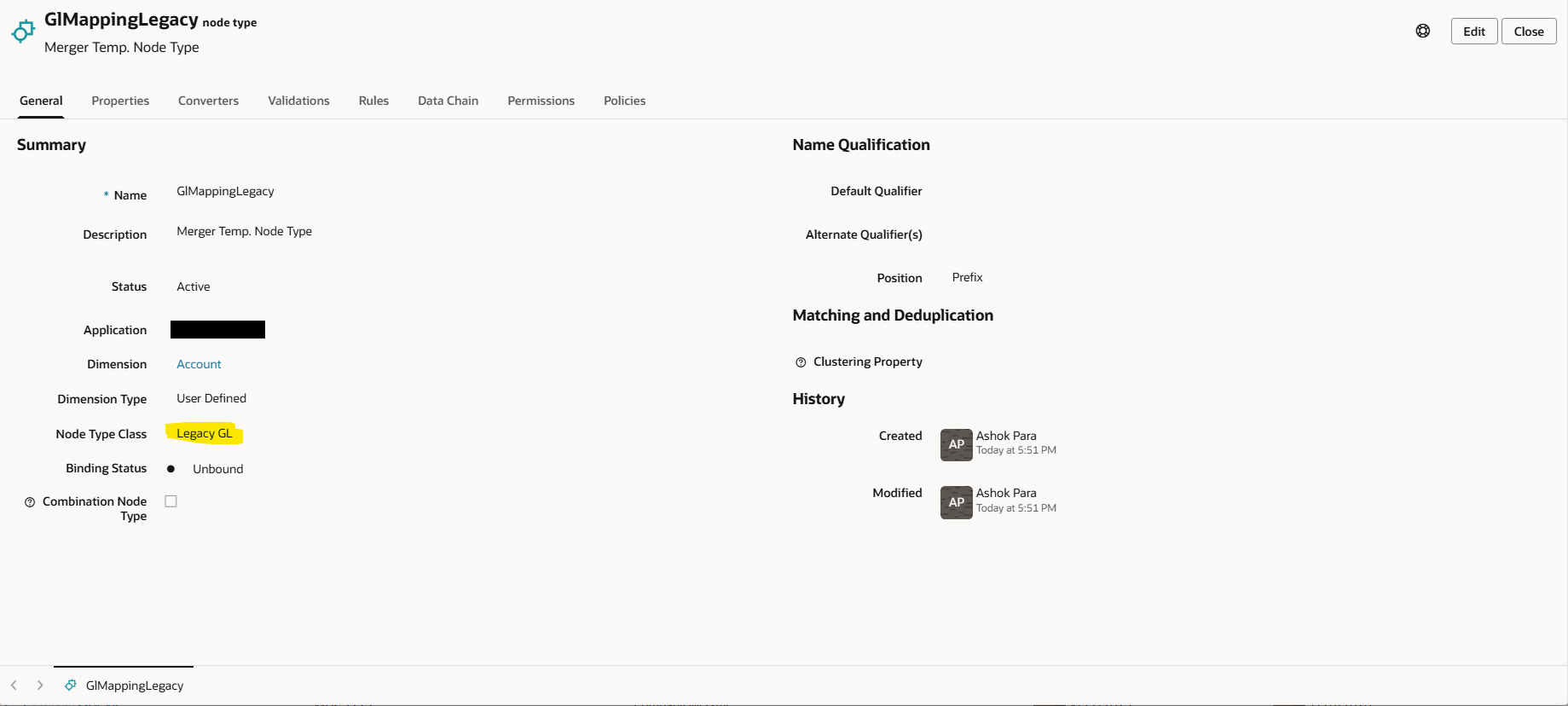
That one choice at creation time — Legacy GL instead of Normal — is the entire trick. Everything else about setting it up is identical to creating a regular node type.
The new Fusion Cloud COA stayed a Normal node type, the way any production hierarchy should — that one's permanent, gets real governance applied to it, and rightly counts against the license.
Then it was a straightforward mapping exercise. For every account combination in the legacy EBS node set, we mapped it to where it landed in the new Fusion COA. Some were obvious — straightforward expense and revenue accounts mapped one-to-one without much debate. Others took real conversations with the finance and merchandising teams, because EBS had account combinations tied to store formats and banners that had since been rebranded or converted, and we had to decide whether the historical activity got rolled into the surviving banner's accounts or kept distinct for trend reporting.
Where this earned its keep was validation. Before final cutover, we ran a query against the Legacy GL node set for anything still unmapped. Found a handful of account combinations nobody had gotten to — most were tied to stores that had closed years earlier, fine to retire, but two of them belonged to a distribution center that had real balances still sitting against it and would have had nowhere to land post-conversion if we'd missed them. That's exactly the kind of gap that turns into a reconciliation nightmare during the first close on the new system if it slips through.
Once cutover happened and the first close on Oracle Cloud ERP reconciled cleanly against the legacy EBS data, we retired the Legacy GL node set. Didn't need it anymore — the mapping was complete, the conversion was documented, and because none of those legacy accounts ever counted against the subscription, walking away from them cost nothing either.
Why this matters beyond the one project
Every EBS-to-Cloud migration I've been part of hits this same shape, and retail in particular tends to make it worse — store growth, banner consolidations, and remodels all leave fingerprints on the COA that nobody ever goes back and cleans up. You end up with a legacy COA that's existed for years, a redesigned COA the business actually wants, and a mapping exercise that needs a full, accurate copy of the old structure to validate against. Without the Legacy GL node type, that mapping exercise quietly inflates your EDM footprint with account data that has no reason to exist past go-live.
With it, the legacy COA capture becomes something you can do thoroughly — load everything, map everything, validate everything — without the licensing conversation turning into a reason to scope down how much of the legacy structure actually gets captured.
Where else this comes up
The retail EBS migration is just one flavor of a pattern that shows up constantly. Anywhere you need to bring in a large, temporary set of accounts purely to map and validate against a target structure, Legacy GL is worth considering. A few of the situations I've run into:
| Scenario | What the legacy side looks like | Why Legacy GL fits |
|---|---|---|
| ERP migration (EBS, PeopleSoft, SAP, JDE → Oracle Cloud) | Years of accumulated GL accounts and segment combinations from the old ERP | Captured once for mapping and conversion validation, then retired after cutover |
| Mergers & acquisitions | The acquired company's own Chart of Accounts, built under a completely different structure | Needed only long enough to map every account into the parent COA and confirm nothing's missing |
| Divestitures / carve-outs | The portion of the COA being separated out, captured for a clean split | Used to validate the carve-out mapping without inflating the remaining org's EDM footprint |
| Old GL to new GL within the same ERP | A prior chart version after a COA simplification or segment redesign | Lets you trace every old account to its new home before sunsetting the legacy structure |
| Multi-ledger consolidation after restructuring | Several legacy ledgers from different business units being merged into one | Each legacy ledger's accounts get mapped in, validated, then dropped post-consolidation |
| Due diligence / pre-acquisition data assessment | A target company's COA, loaded just to assess data quality before a deal closes | Temporary by definition — the data may never even reach production if the deal doesn't go through |
The common thread in every row: the legacy data only needs to exist long enough to be mapped and validated against something else. The moment it has a permanent place in ongoing governance, it stops being a Legacy GL use case and becomes a regular Normal node type instead.
When this isn't the right call
This only works because the legacy EBS structure was genuinely temporary — it existed to get mapped, validated, and then retired. If part of that legacy environment is going to keep running in parallel for an extended period, or if you need to track it with custom properties beyond what Legacy GL allows, that's not a Legacy GL situation anymore — that's a second Normal node type you're going to govern for real. Know which one you're actually dealing with before you set it up, because switching later isn't free.
Bottom line
The Legacy GL node type isn't really about COA redesign in the abstract — it's about any scenario where you need to bring in a large set of accounts you only need temporarily for mapping and validation. A retail EBS-to-Cloud ERP migration, with all the store and banner history baked into the COA, is one of the cleanest examples of that I've run into, and it's the project that made this feature click for me.
— Ashok