If you've ever tried to plan a migration off legacy Oracle DRM onto Oracle EDM, you already know the problem: the DRM web client is fine for day-to-day stewardship, but it was never designed to answer the questions a migration actually needs answered.
How many node types do we have, and what properties are attached to each? Which exports are actually feeding a downstream system, and which ones haven't run in two years? Who has access to what, across every hierarchy, and through which AD groups? None of that is a few clicks away. Most of it isn't reachable through the UI at all.
So over a few years of running DRM as a hands-on admin, I built up a library of SQL that goes straight to the back-end schema. It started because the GUI just wasn't fast enough for daily work. But it turned out to be exactly what I needed when the real question became: how do we move everything in here to EDM without leaving something behind?
This is that toolkit, organized around how a migration actually unfolds rather than just a pile of queries. One thing worth knowing before you run any of this: the DRM database schema name varies by installation. You might see it as RM_DB, DRM_DB, DRMREPO_DB, or something else entirely — it's set during deployment and differs from company to company. In the queries below I've used RM_DB as a placeholder; swap it for whatever your DBA tells you the actual schema name is. The table and hierarchy names are illustrative too — but the underlying Oracle table names themselves (RM_NODE, RM_HIERARCHY, RM_EXPORT, RM_ACCESS_GROUP_DEFINITION, and so on) are standard across DRM installations. Those you won't need to change.
One caveat before we get into it: these are direct, read-only queries against the DRM database schema, not anything exposed through Oracle's official API. Treat this as an internal discovery technique. Run it against a non-production copy if you can, get DBA sign-off for read access, and keep it strictly to SELECT. Nothing here writes anything.
One more thing worth flagging: DRM doesn't always sit on an Oracle database. Plenty of installations run on Oracle DB, but it's just as common to find DRM backed by Microsoft SQL Server, depending on how the environment was originally stood up. The table and column structure is the same either way — it's part of the DRM data model, not the database engine — but the SQL syntax below is written Oracle-style (TO_CHAR, SYSDATE, and so on). If your back end is SQL Server, the translation is straightforward: swap TO_CHAR for CONVERT or CAST, SYSDATE for GETDATE(), and adjust date arithmetic accordingly. The joins and table relationships themselves don't change.
A Quick Word on the DRM Migration Utility
Before we get into the SQL — Oracle does ship a dedicated migration tool for DRM, and it's worth knowing about it. It runs on its own separate URL from the DRM web client, and once you log in you get four straightforward options:
- Extract — pull metadata objects out of a DRM system to a file, for backup, auditing, or loading into another system
- Load — push a metadata objects file into a DRM system (Dev to Prod, for example); existing objects with the same name get updated
- Difference — compare metadata objects between two sources, see what's different, optionally generate a file with just the deltas; useful for undoing unauthorized changes or spotting misconfigured objects
- View File — browse, search, and inspect a metadata objects file without loading it anywhere
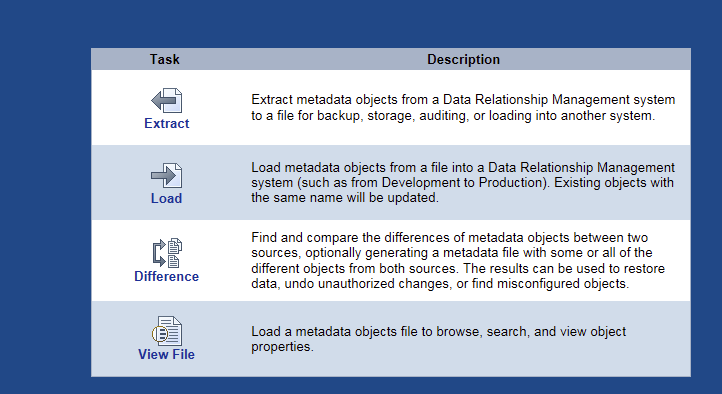
Oracle DRM Migration Utility — the main screen after login. Four tasks, clearly separated. Most migration work lives in Extract and Load.
It's a genuinely solid tool for what it does. Once you pick Extract or Load, it presents a tree of object categories to choose from — Books, Exports, External Connections, Node Access Groups, Node Types, Object Access Groups, Property Categories, Property Definitions, Queries, Hierarchy Groups, System Preferences, Validations, and Version Variables. You select what you need, it resolves the dependencies, and packages it up. If you're moving DRM configuration objects between environments, this is the right way to do it.
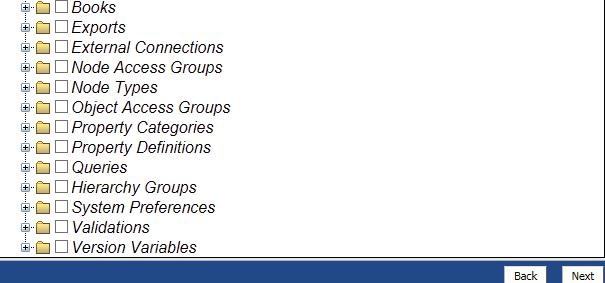
The object selection screen — every major DRM configuration category is here. Select what you need, and the utility handles dependency resolution before packaging.
What the back-end queries below give you is something different: visibility during the discovery and research phase, before you're ready to migrate anything. The Migration Utility moves objects. The back-end schema tells you what's actually in there, what it connects to, and whether it's even worth moving. Those are different questions, and the second set is usually the one that takes the most time — especially if you're coming into a DRM environment you didn't build yourself.
The two work together. The SQL gets you a clear, verified picture of the environment. The Migration Utility moves it once you know what you're dealing with.
Why the GUI Falls Short for Discovery
DRM's web client is built for browsing — one hierarchy, one version, one node at a time. A migration needs the opposite: every hierarchy at once, every node type and its properties, every export and what it actually feeds, every security group and who's in it. That's an inventory problem, and DRM's RM_DB is a relational database. Which means it answers inventory questions in seconds, once you know where to look.
Start Here: What's Actually in the System
The first thing I do before touching any EDM configuration is get a complete, accurate picture of what's in the legacy system — not what the documentation says is there, which is almost always out of date.
Node types and properties is the single most useful query in the whole toolkit. It's the direct input to your EDM node type and property design:
SELECT DISTINCT
    P.C_ABBREV         AS PROPERTY,
    P.C_DESCR          AS DESCRIPTION,
    P.E_PROP_TYPE      AS PROPERTY_TYPE,
    P.E_DATA_TYPE      AS DATA_TYPE,
    P.C_DERIVER_CLASS  AS SCRIPT_OR_FORMULA,
    NT.C_ABBREV        AS NODE_TYPE
FROM RM_DB.RM_PROPERTY_DEFINITION P,
     RM_DB.RM_NODE_TYPE_PROPERTY NTP,
     RM_DB.RM_NODE_TYPE NT,
     RM_DB.RM_PROPERTY_PARAM V
WHERE P.I_PROPERTY_ID = NTP.I_PROPERTY_ID
  AND NTP.I_PROPERTY_ID = V.I_PROPERTY_ID
  AND NT.I_NODE_TYPE_ID = NTP.I_NODE_TYPE_ID;
Run this and you get, in a spreadsheet, every node type and every property attached to it — including whether the property is a formula, a script-derived value, or a plain attribute. That C_DERIVER_CLASS column is worth paying close attention to, and I'll come back to it.
Property categories — DRM groups properties into categories for security and organizational purposes, and this often maps directly onto how you'll want to organize access and edit permissions in EDM:
SELECT DISTINCT
    C.C_ABBREV        AS PROPERTY,
    C.C_LABEL         AS PROPERTY_LABEL,
    C.E_PROP_TYPE     AS PROPERTY_TYPE,
    CAT.C_CATEGORY_CODE AS PROPERTY_CATEGORY
FROM RM_DB.RM_PROPERTY_CATEGORY PC,
     RM_DB.RM_CATEGORY CAT,
     RM_DB.RM_PROPERTY_DEFINITION C
WHERE PC.I_CATEGORY_ID = CAT.I_CATEGORY_ID
  AND PC.I_PROPERTY_ID = C.I_PROPERTY_ID
ORDER BY 4, 1;
Hierarchy node counts — you need real numbers before you can estimate extraction batches or EDM load times:
SELECT DISTINCT
    B.C_ABBREV  AS VERSION_NAME,
    B.I_VERSION_ID,
    COUNT(A.I_NODE_ID) AS NODE_COUNT
FROM RM_DB.RM_NODE A,
     RM_DB.RM_VERSION B
WHERE B.I_VERSION_ID = :working_version_id
  AND A.I_VERSION_ID = B.I_VERSION_ID
GROUP BY B.I_VERSION_ID, B.C_ABBREV;
Run that against both your working version and your current production version. In my experience there's almost always drift between them that nobody's noticed, and you'd rather find it now than during cutover week.
Top node and hierarchy structure — useful for a quick sanity check that your hierarchy inventory matches what stakeholders think exists:
SELECT DISTINCT
    B.C_ABBREV AS VERSION_NAME,
    A.C_ABBREV AS HIERARCHY,
    C.C_ABBREV AS TOP_NODE
FROM RM_DB.RM_HIERARCHY A,
     RM_DB.RM_VERSION B,
     RM_DB.RM_NODE C
WHERE A.I_VERSION_ID = B.I_VERSION_ID
  AND A.I_TOP_NODE_ID = C.I_NODE_ID
  AND B.C_ABBREV = :version_label;
The Integration Map: What Actually Depends on This Data
This is the phase migrations most often get wrong, because it's invisible from the GUI. DRM exports feed downstream systems, and if you don't know which ones are live and what they're actually feeding, you will break something during cutover that nobody remembers exists.
Full export inventory with target tables — this one query is worth the entire toolkit on its own:
SELECT DISTINCT
    EN.I_EXPORT_ID                AS EXPORT_ID,
    EN.C_HIERARCHY_ABBREV         AS HIERARCHY,
    E.C_EXPORT_ABBREV             AS EXPORT_NAME,
    E.C_EXPORT_DESCR              AS EXPORT_DESCRIPTION,
    E.E_EXPORT_OUTPUT_MODE        AS TARGET_TYPE,
    TO_CHAR(EP.X_VALUE)           AS TARGET_TABLE
FROM RM_DB.RM_EXPORT_NODE EN,
     RM_DB.RM_EXPORT_COLUMN EC,
     RM_DB.RM_EXPORT E,
     RM_DB.RM_EXPORT_PARAM EP
WHERE EN.I_EXPORT_ID = EC.I_EXPORT_ID
  AND EC.I_EXPORT_ID = E.I_EXPORT_ID
  AND E.I_EXPORT_ID = EP.I_EXPORT_ID
  AND E.E_EXPORT_OUTPUT_MODE LIKE 'Table'
  AND EP.C_KEY LIKE 'DBTableName'
ORDER BY E.C_EXPORT_ABBREV;
Every row in that result is a live integration point — an export that's landing in a real downstream table somewhere. A data warehouse staging area, a reporting layer, a consolidation system. Before you stand up EDM, every one of these needs a decision: does this get rebuilt as an EDM export, does it get retired because the downstream system is going away too, or does it need a bridge while both systems are running in parallel?
Export-to-book mapping, for exports bundled under DRM books — commonly used for GL or ERP feeds:
SELECT DISTINCT
    B1.C_BOOK_NAME      AS BOOK_NAME,
    E.C_EXPORT_ABBREV   AS EXPORT_NAME,
    EC.C_TITLE          AS PROPERTY_NAME,
    TO_CHAR(V.X_KEY)    AS PROPERTY_VALUE
FROM RM_DB.RM_EXPORT_COLUMN EC,
     RM_DB.RM_EXPORT E,
     RM_DB.RM_PROPERTY_PARAM V,
     RM_DB.RM_BOOK_ITEM BI,
     RM_DB.RM_BOOK B1
WHERE E.I_EXPORT_ID = EC.I_EXPORT_ID
  AND BI.I_EXPORT_ID = E.I_EXPORT_ID
  AND B1.I_BOOK_ID = BI.I_BOOK_ID
  AND E.C_EXPORT_ABBREV LIKE :export_name_pattern;
This is particularly useful when you're consolidating multiple legacy GL feeds — it shows you exactly which properties each book-organized export pulls, so you can confirm your new EDM export design captures everything the old one did.
Security: What Has to Be Rebuilt
DRM security runs on Node Access Groups — local and global — and Workflow Access Groups, all tied to Active Directory group membership. None of it carries over automatically. EDM has its own access model, and it works differently, so you need a complete export of who has access to what before you can design the equivalent structure in EDM.
Local node access with hierarchy and node context — this is the one that tells you what a group can actually touch, not just that the group exists:
SELECT DISTINCT
    G.C_ABBREV              AS SECURITY_GROUP,
    G.C_DESCR               AS GROUP_DESCRIPTION,
    G.E_ACCESS_GROUP_TYPE   AS GROUP_TYPE,
    G.C_CSS_GROUP_NAME      AS AD_GROUP_NAME,
    GL.E_ACCESS_LEVEL       AS ACCESS_LEVEL,
    GL.E_WORKFLOW_ACCESS_LEVEL AS WORKFLOW_ACCESS_LEVEL,
    U.C_USER_NAME           AS USER_ID,
    H.C_ABBREV              AS HIERARCHY,
    N.C_ABBREV              AS NODE
FROM RM_DB.RM_ACCESS_GROUP_DEFINITION G,
     RM_DB.RM_ACCESS_GROUP_PROP_LOCAL GL,
     RM_DB.RM_ACCESS_GROUP_USER GU,
     RM_DB.RM_USER U,
     RM_DB.RM_HIERARCHY H,
     RM_DB.RM_NODE N
WHERE G.I_SECURITY_ID = GL.I_SECURITY_ID
  AND GL.I_SECURITY_ID = GU.I_SECURITY_ID
  AND GL.I_HIERARCHY_ID = H.I_HIERARCHY_ID
  AND GL.I_NODE_ID = N.I_NODE_ID
  AND GL.B_LEAF = 0
  AND GL.I_VERSION_ID = :working_version_id
  AND H.I_VERSION_ID = N.I_VERSION_ID
  AND GU.I_USER_ID = U.I_USER_ID
ORDER BY G.C_ABBREV, H.C_ABBREV;
Run the same pattern against RM_ACCESS_GROUP_PROP_GLOBAL for global NAGs — global and local access are stored separately and you need both.
Active users with their DRM roles — your provisioning list for the new system:
SELECT DISTINCT
    U.I_USER_ID,
    U.C_USER_NAME,
    U.C_FULL_NAME,
    R.C_ROLE_NAME AS DRM_ROLE
FROM RM_DB.RM_USER U,
     RM_DB.RM_USER_ROLE UR,
     RM_DB.RM_ROLE R
WHERE U.I_USER_ID = UR.I_USER_ID
  AND R.I_ROLE_ID = UR.I_ROLE_ID
  AND U.B_LOGIN_LOCKOUT <> 1
ORDER BY U.I_USER_ID;
Anyone active in DRM who isn't accounted for in your EDM access design is a gap that surfaces as a support ticket in week one. Better to find them now.
Workflow and Business Logic
This is the part of a DRM environment that's easiest to overlook entirely, because it lives in configuration rather than data. And it's exactly the kind of thing that determines whether your EDM workflow design actually matches how the business works today.
Workflow models, stages, tasks, and assigned groups:
SELECT DISTINCT
    A.C_ABBREV AS WORKFLOW_MODEL,
    A.C_LABEL  AS MODEL_LABEL,
    E.C_ASSIGNED_GROUP AS ASSIGNED_NAG,
    D.E_WORKFLOW_STAGE_TYPE AS STAGE_TYPE,
    D.C_LABEL AS STAGE_DESCRIPTION
FROM RM_DB.RM_WF_MODEL A,
     RM_DB.RM_WF_MODEL_STAGE_TASK B,
     RM_DB.RM_WF_TASK C,
     RM_DB.RM_WF_MODEL_STAGE D,
     RM_DB.RM_WF_MODEL_STAGE_ASSG_GROUP E
WHERE A.I_MODEL_ID = B.I_MODEL_ID
  AND B.I_MODEL_ID = D.I_MODEL_ID
  AND B.I_TASK_ID = C.I_TASK_ID
  AND A.I_MODEL_ID = E.I_MODEL_ID
  AND D.I_STAGE_ID = E.I_STAGE_ID
  AND A.C_ABBREV = :workflow_model_name
ORDER BY 1;
Validations per workflow task — these are the business rules that fire at each step:
SELECT DISTINCT
    B.C_ABBREV AS WF_TASK,
    D.C_ABBREV AS VALIDATION,
    E.C_PROPERTY_NAME AS VALIDATED_PROPERTY
FROM RM_DB.RM_WF_TASK_VALIDATION A,
     RM_DB.RM_WF_TASK B,
     RM_DB.RM_VALIDATION_DEFINITION D,
     RM_DB.RM_WF_TASK_VALIDATION_PROPERTY E
WHERE A.I_TASK_ID = B.I_TASK_ID
  AND A.I_VALIDATION_ID = D.I_VALIDATION_ID
  AND A.I_TASK_ID = E.I_TASK_ID
  AND A.I_TASK_VALIDATION_ID = E.I_TASK_VALIDATION_ID;
Every validation rule you find here exists because something broke once and someone decided it shouldn't break that way again. Don't treat them as legacy noise to skip — treat them as a list of lessons the business already paid to learn.
What Doesn't Carry Over — and Why That's Fine
Before I get into the specifics, I want to say something clearly: DRM earned its reputation. For the better part of two decades, it was the benchmark for data relationship governance — before "master data management" was even a standard budget line item, DRM was already doing version-controlled hierarchy management, node-level workflow, and granular security at a depth that competing tools didn't come close to matching.
One of its most underrated strengths is its derived property engine. DRM lets administrators write real JavaScript formulas directly against a property — conditional values, cross-property calculations, string manipulation — all running server-side whenever the property is evaluated, without ever leaving the DRM configuration layer. That C_DERIVER_CLASS column you saw earlier is the trace of that capability. Those formulas often represent years of carefully encoded institutional knowledge about how data should behave, and they're one of the reasons DRM environments accumulate so much custom business logic over time: the tool made it genuinely easy to model real governance rules directly in the data layer.
Where DRM shows its age isn't capability — it's connectivity. It was designed for an on-premises world, and the gap that drives most migrations today is cloud integration: connecting natively to cloud ERP, cloud EPM, and REST-based ecosystems the way EDM does out of the box. That's the real reason organisations move, not because DRM couldn't govern data — it absolutely could — but because the world it was built for has changed. So what follows isn't a list of DRM failures. It's a list of things that need a fresh design because the architecture underneath has shifted.
JavaScript-derived properties don't port as-is. EDM's validation and rules model is more declarative by design — built for a multi-tenant cloud environment where auditability and governance of the rules themselves matters, not just the data. Any property with custom derivation logic needs to be reimplemented: either as an EDM validation rule, pushed upstream into the source system, or handled in an external script against the EDM REST API for genuinely complex cases. Budget real time for this. These aren't configurations you can lift-and-shift; they're logic that needs to be faithfully rebuilt.
Global and local NAGs map to a different security model, not just different names. DRM's global/local split — each independently joinable to AD groups — doesn't have a direct equivalent in EDM's application, dimension, and role-based access model. You can't export your DRM security tables and import them anywhere useful. What you can do is use the access queries above to capture the intent behind each grant — who should be able to edit what, and where — and rebuild that intent natively in EDM. The literal group definitions won't carry over, but the design logic behind them can.
Workflow stage structure needs a redesign, not a transcript. Both systems do multi-stage approvals with assigned groups, but DRM's stage/task/validation model and EDM's request-and-viewpoint framework aren't structurally the same. A workflow that took three custom stages in DRM might collapse into a single EDM viewpoint with built-in validations, or might need more stages if EDM's model handles something DRM's didn't. Use the workflow queries as a requirements document — ask what each stage was trying to accomplish, then design that intent in EDM rather than trying to mirror the old stage count.
Books and export bundling are DRM-specific. The "book" concept — bundling several exports into a combined GL/ERP feed — doesn't have a named equivalent in EDM. EDM handles multi-export delivery through its own export and connection framework, which works differently. If your downstream consumers depend on the bundled delivery behavior, that's a design conversation with the receiving system team, not a setting you flip in EDM.
None of this is a problem with either system. DRM did its job — genuinely well — for the era it was built in. The redesign work exists because you're moving from an on-premises governance tool to a cloud-native one, and cloud integration was never what DRM was asked to do. More often than not, the redesign is actually an opportunity: a chance to retire workarounds that only existed because DRM's older architecture forced your hand, and to gain the cloud connectivity that's the whole point of the move. But it does mean a chunk of what your discovery queries surface isn't "migrate this" — it's "decide what this should become." Get those categories in front of stakeholders early, before anyone assumes the cutover is a copy-paste exercise.
What Can't Be Frozen on Cutover Day
A migration has a cutover date. DRM doesn't care. In-flight work keeps accumulating right up to the moment you lock the system, and if you're not tracking it, you'll find out about it from a frustrated user after go-live.
Everything that isn't committed or rejected yet:
SELECT DISTINCT
    I.I_WORKFLOW_REQUEST_ID,
    I.C_NODE_NAME,
    I.C_NODE_DESCR,
    I.E_WORKFLOW_ACTION__ORIGINATING,
    R.I_CURRENT_STAGE_ID
FROM RM_DB.RM_WF_REQUEST_ITEM I
LEFT JOIN RM_DB.RM_WF_REQUEST R
    ON R.I_WORKFLOW_REQUEST_ID = I.I_WORKFLOW_REQUEST_ID
WHERE R.E_WORKFLOW_STATUS__CURRENT NOT IN ('Committed', 'Rejected');
This should be empty — or fully accounted for — before the legacy system goes read-only.
Draft and pending requests by submitter, so you can chase down actual owners directly rather than sending a generic "please close your open items" announcement that nobody reads:
SELECT DISTINCT
    A.I_WORKFLOW_REQUEST_ID AS REQUEST_ID,
    B.C_TITLE               AS REQUEST_TITLE,
    A.E_WORKFLOW_ACTION__ORIGINATING AS ACTION_TYPE,
    A.C_NODE_NAME,
    B.C_CREATED_BY          AS SUBMITTED_BY,
    C.C_FULL_NAME           AS SUBMITTER_NAME,
    TRUNC(B.D_SUBMITTED_ON) AS SUBMIT_DATE,
    B.E_WORKFLOW_STATUS__CURRENT AS STATUS
FROM RM_DB.RM_WF_REQUEST_ITEM A,
     RM_DB.RM_WF_REQUEST B,
     RM_DB.RM_USER C
WHERE A.I_WORKFLOW_REQUEST_ID = B.I_WORKFLOW_REQUEST_ID
  AND B.C_CREATED_BY = C.C_USER_NAME
  AND TRUNC(B.D_LAST_MODIFIED_ON) BETWEEN SYSDATE - 14 AND SYSDATE
ORDER BY SUBMIT_DATE DESC;
The Audit Trail
At some point during or after the migration, someone will ask whether a specific change happened before or after cutover, or whether a particular property was ever set to something historically. DRM's transaction history is the answer to that question — and it doesn't follow you into EDM automatically.
SELECT
    I_TRANSACTION_ID,
    D_TIMESTAMP        AS TRANSACTION_DATE,
    C_USER_NAME         AS USER_ID,
    C_ACTION            AS ACTIVITY,
    C_VERSION_ABBREV    AS VERSION,
    C_HIERARCHY_ABBREV  AS HIERARCHY,
    C_NODE_DESCR        AS NODE_DESCRIPTION
FROM RM_DB.RM_TRANSACTION_HISTORY
WHERE D_TIMESTAMP BETWEEN :start_date AND :end_date
  AND C_ACTION IN ('Update Property Definition', 'Update Node Property Value')
  AND C_USER_NAME NOT LIKE '@@PROCESS'
ORDER BY D_TIMESTAMP ASC;
Pull the full history before you decommission the legacy instance. Once that database is gone, this is gone with it.
Putting It All Together
Strip away the SQL and what you have is a six-part checklist. I'd run it in this order:
- Inventory the metadata — every node type, property, category, hierarchy and node count. This is your EDM dimension and node type design input.
- Map every integration — every export, what it feeds, whether that downstream system is staying or going. This is the most common source of surprise outages in any DRM-to-EDM cutover.
- Export the full security model — every access group, user, and role, mapped to actual hierarchy and node access. This becomes your EDM access group design and your user provisioning list.
- Document the workflow business logic — every workflow model, task, and validation rule. Each one is a business requirement someone decided was worth enforcing. Decide deliberately whether each one gets rebuilt, simplified, or retired in EDM.
- Flag what needs redesign — derived property logic, global/local security mapping, workflow stage structure, and book-bundled exports all need a deliberate EDM-native design. Surface these to stakeholders early so they're scheduled as design work, not discovered as delays.
- Close open work and archive the audit trail — get every in-flight request to a terminal state, and pull the full transaction history before the database goes away.
None of this is complicated SQL. It's mostly inner joins across RM_DB's core tables. But running it systematically — before you touch EDM configuration — turns "we think we know what's in here" into "we have a verified inventory of everything in here." And that difference is usually what separates a clean cutover from three months of post-go-live surprises.
Planning a DRM-to-EDM migration and want to talk through the discovery approach or build this out into a more automated audit script? Happy to dig into it — drop a comment or get in touch directly.